Small groups work. But you can’t be everywhere.
OKO coaches the groups you’re not sitting with, so every group keeps collaborating and making sense of the math. Grades 3–12.
Explore a pilot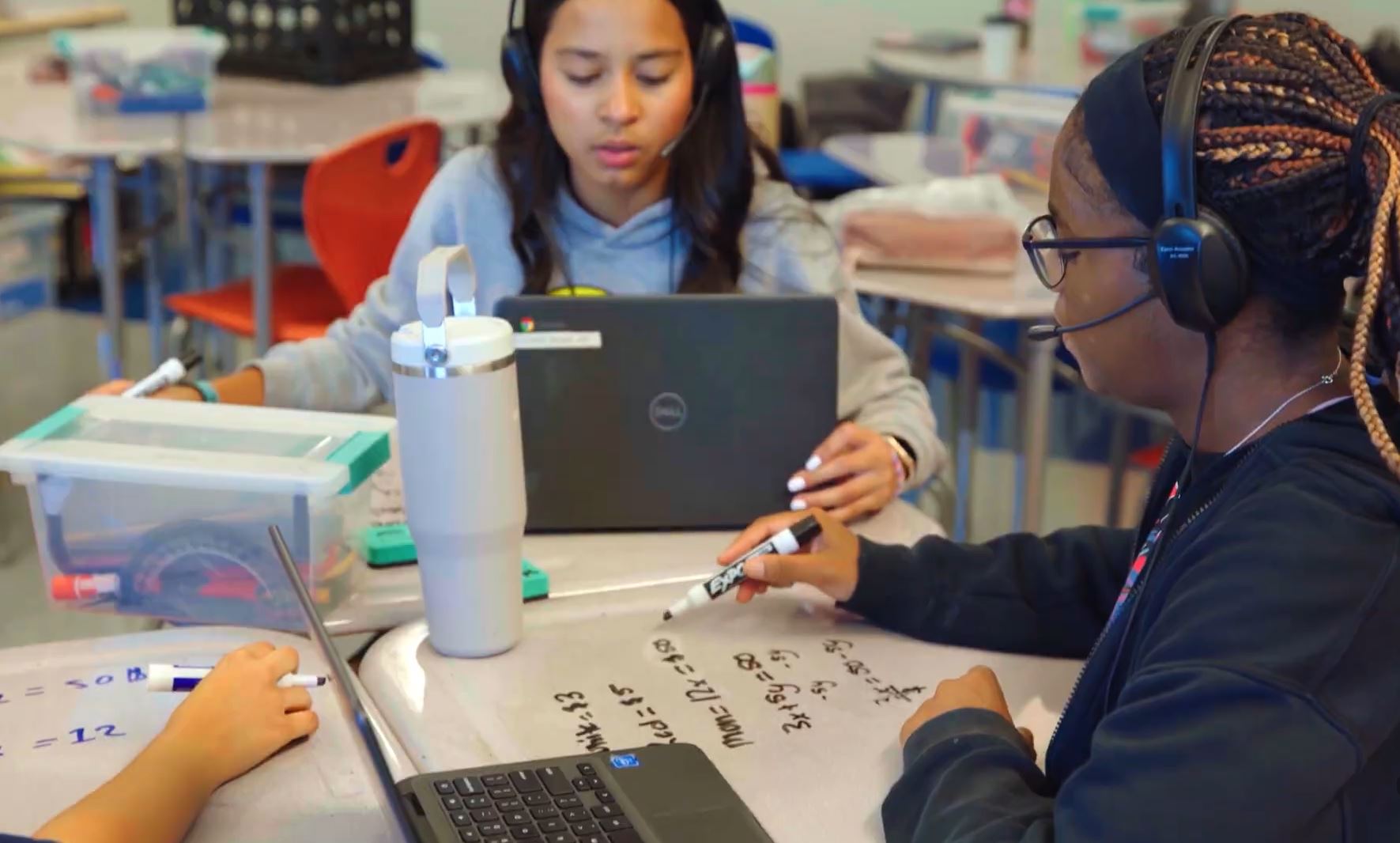
The coverage problem
OKO runs the groups you’re not sitting with.
You’re at the back table with the group that needs you. Across the room, a group works a problem set with OKO between them, talking it through together.
OKO is a second pair of hands, not a replacement for you. You lead the room; OKO covers the tables you can’t reach.
What OKO does for you
A second pair of hands for small groups.
Gets every group talking
Whether you run guided math, a math workshop, a Building Thinking Classrooms setup, or math stations, OKO facilitates all your groups at once, keeping two to five students reasoning out loud about the math.
Shows you what happened in every group
After each session, OKO shows you how each group did on the math and where they got stuck. Use those insights to plan your next lesson.
Fits the curriculum you already teach
Filter by standard, learning component, and question type, and pick the exact questions a group works on. It aligns to Illustrative Mathematics at the lesson level, to Eureka at the scope-and-sequence level, and to other scopes and sequences on request.
How OKO works
Four steps, start to finish.
Each step shows what happens in the room. Choose “Why it works” for the thinking behind it.
What an OKO session looks like
3 easy steps to run OKO group sessions
Pick the math
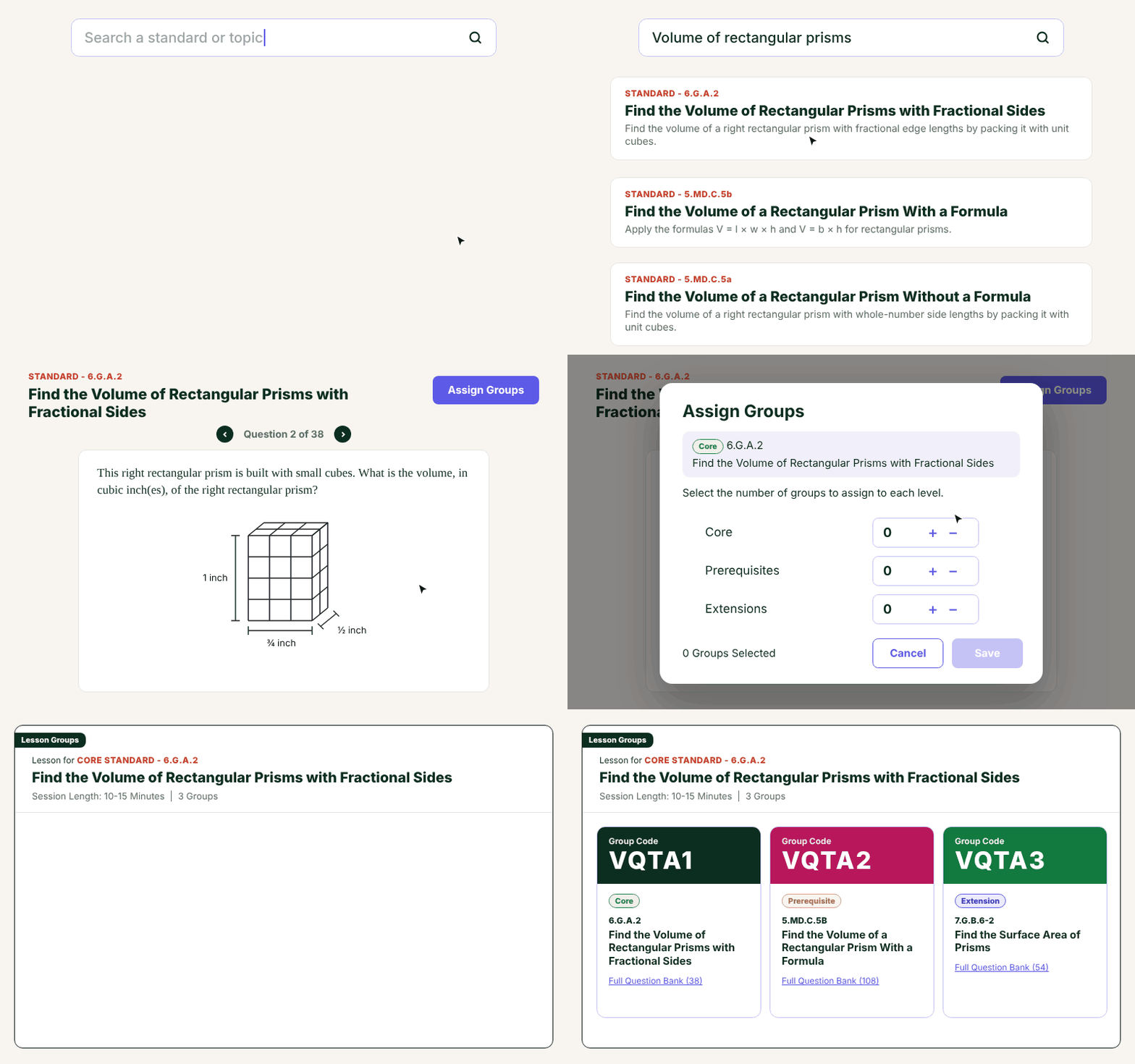
Pick a lesson or a standard from the scope and sequence you already teach. OKO builds each group’s problem set, including prerequisite and extension groups, or you hand-pick the questions. You choose the students for each group and share its code to get them in.
Groups work best on a problem pitched to them. Building sets from your own scope and sequence keeps OKO time on what you are teaching this week, with prerequisite or extension work for the groups that need it.
Get a coach at every table
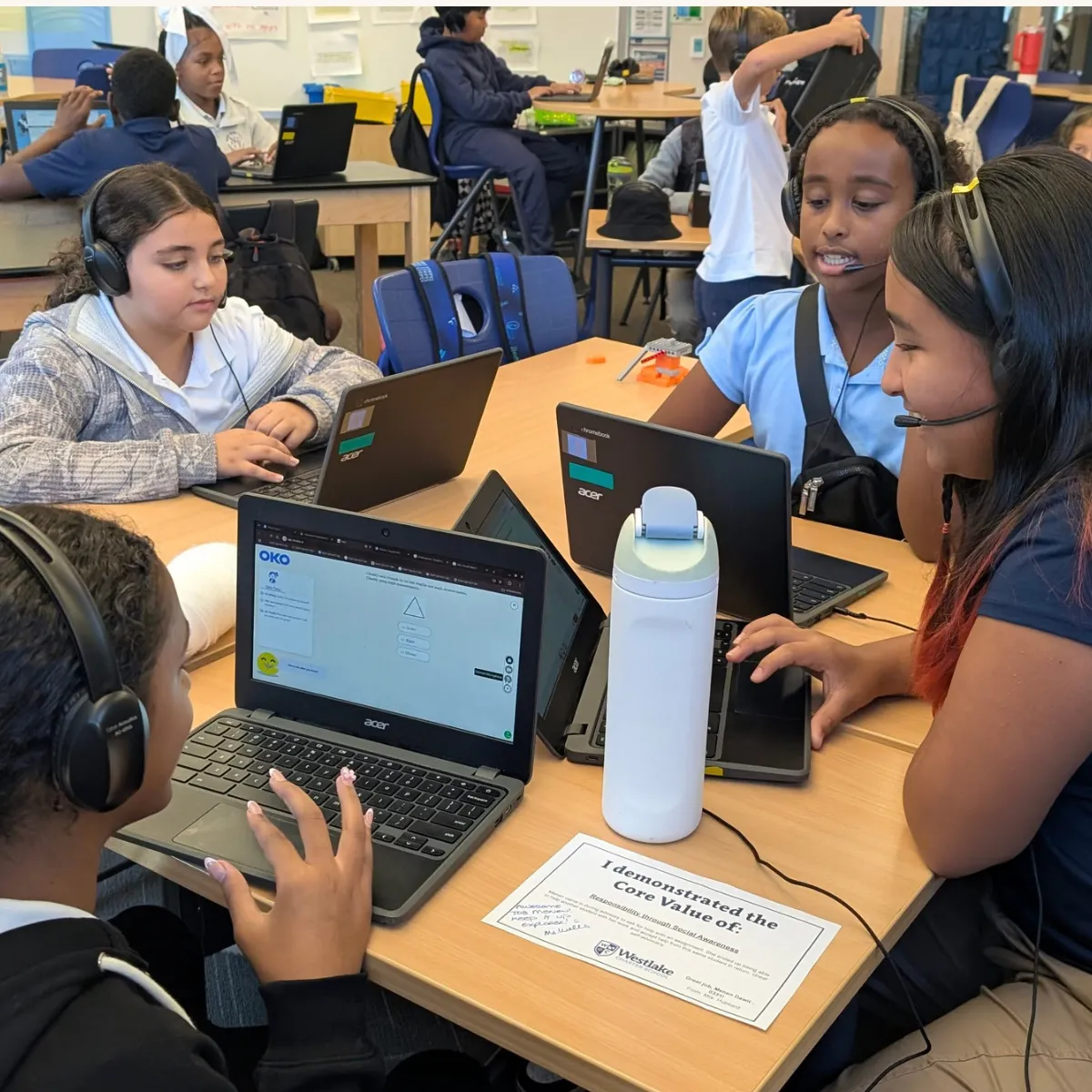
Each student joins their small group on their own Chromebook, laptop or tablet with a headset. They sit together, work the problem on their own, then talk it through as a group. OKO gives just-in-time support and math talk coaching, with a hint only when the group is stuck.
Solo time first means every student arrives with an answer to explain. In WestEd’s classroom observations, OKO students explained their thinking and corrected each other’s errors, while comparison students rarely talked math with each other.
See a full session ▸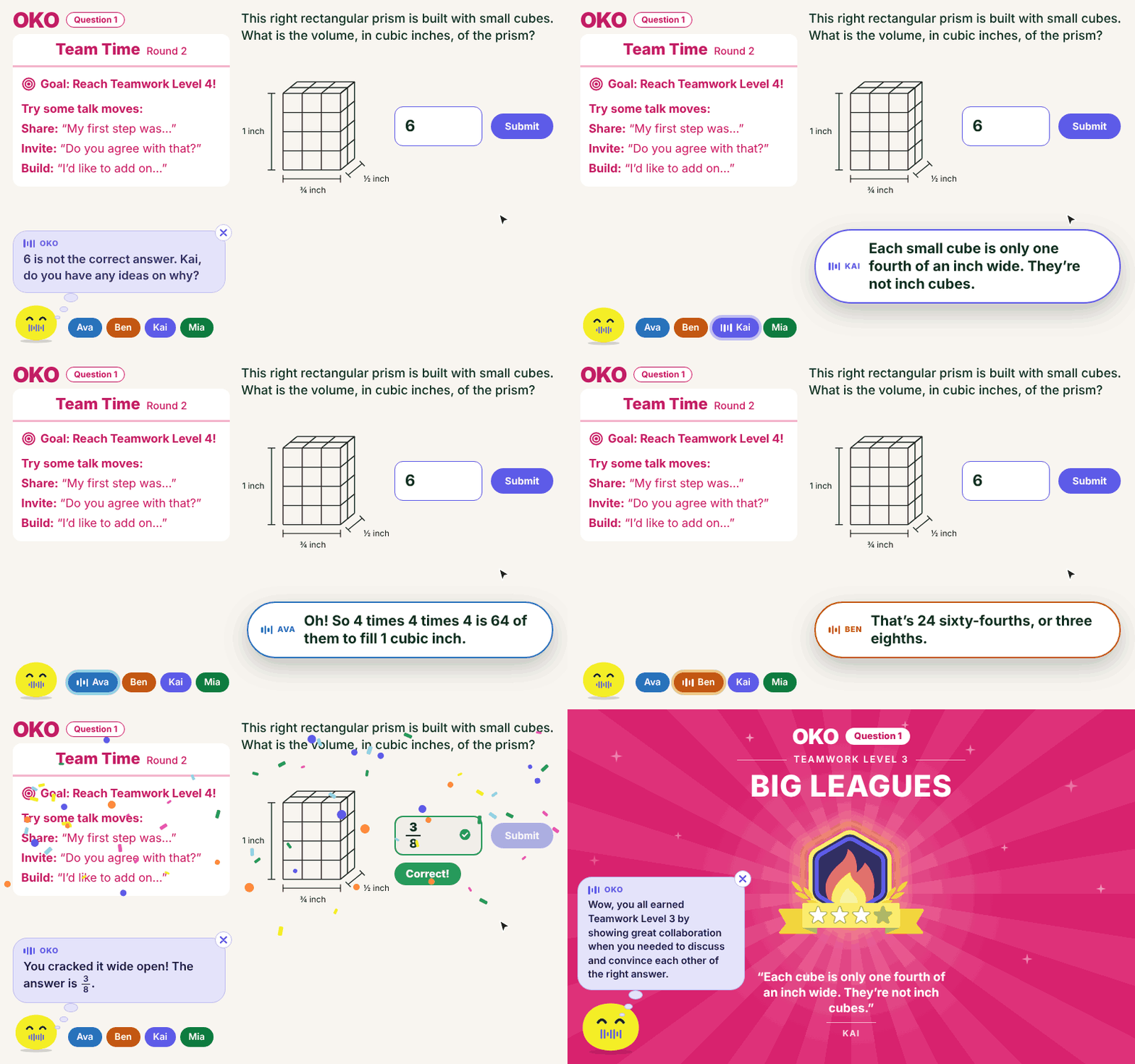
See who needs you
The live dashboard shows every group’s math accuracy and collaboration, question by question, while you circulate. OKO flags groups that are struggling or have stopped collaborating, so you know where to go next.
You can’t sit with every group. The dashboard points you to the one that needs you now, so your time goes where it changes the most.

Plan with insights from every group
Every session gives you rich insights into how each group did on the math, discourse and collaboration, with recommendations you can act on right away. The full transcript is there when you want it.
Teachers in WestEd’s study estimated OKO saved them 2.8 hours a week, most of it on facilitating math discussion (teacher-reported). The insights turn what students said into tomorrow’s groups.

How classrooms use it
Three ways to run OKO in your math block.
OKO fits core math blocks and intervention blocks. Pick the setup that matches how you already run small groups.
Recommended use: two or three sessions a week, 15 to 20 minutes each, 30 to 45 minutes in total.
Every group on OKO
The whole class works in OKO groups at once. You circulate with the live dashboard and go to the group it flags.
Core block
Pull your own group
Every group is on OKO except the one you pull. You teach that group at your table, and OKO coaches the rest.
Core or intervention
Station rotation
OKO is one station. While you teach a group at your table, another group works with OKO, and a third practices on their own. Then they rotate.
Core or intervention
Green dots are students. Pink is the teacher. A purple outline means OKO is coaching that group. Orange is a dashboard flag.
Where OKO fits in MTSS
Support at every tier.
OKO fits where you already run small groups: WIN time, intervention blocks, and station rotation inside core instruction. Same footprint, now coached and measured.
Tier 1
Core instruction
Every student gets coached small-group time during the core math block, on grade-level work from your scope and sequence.
Tier 2
Targeted support
Group students who need the same prerequisite skill. OKO builds a problem set for each group and coaches them through it, while the teacher sees which groups are still stuck.
Tier 3
Intensive support
OKO can run small groups of Tier 3 learners who share a need. And because it coaches the other groups, teachers and interventionists get time back for their highest-need students.
It works alongside intensive, individualized support, not in place of it.
What leaders get
Know it’s being used, and what it’s doing.
Usage against the recommendation
OKO tracks minutes per student against the recommended 30 to 45 a week and reports it back to your school.
Math and collaboration
Group reports cover the math, the discourse and the collaboration, not just right and wrong answers.
Independent evidence
Independent evidence for small-group math.
WestEd, an independent research organization, ran a randomized controlled trial of OKO with 1,040 fourth and fifth graders in Hamilton County, Tennessee.
The randomized comparison of all students: OKO classrooms showed more math growth than comparison classrooms, though with only 20 teachers the difference wasn’t statistically conclusive.
of extra math growth in ten weeks, among students who used OKO
Teachers chose who used OKO, so read this as a signal, not proof.
OKO students explained their thinking and corrected each other’s errors. Comparison students rarely talked math with each other.
Students were engaged in 9 of 10 OKO classrooms observed.
saved each week, by teachers’ own estimate, against 1.0 with their usual software



Randomized comparison: growth above projection +1.46 RIT (p = 0.166); spring score +1.40 (p = 0.218); threshold p < 0.10.
~1.5 months: +2.46 RIT on growth (p = 0.033) and spring score (p = 0.047); teachers chose who used OKO, and those students started about 7 RIT points higher, so this isn’t causal. LXD’s Tier III rests on that comparison.
2.8 hours: post-survey, 10 OKO vs. 8 comparison teachers. Attrition is low under What Works Clearinghouse standards, per WestEd.
Download the two-page summary (PDF)Read the full research and evidenceNot a chatbot
AI that brings kids together, not one that keeps them apart.
Typical AI tutor
One student, one screen
A private conversation between a child and a model.
Works for the small share of highly motivated learners.
More screen time, less talk.
No record of how a student works with other people.
OKO
Two to five students, one problem
Students explain, question each other and build on what a peer just said.
Most of the session is kids talking to kids.
The teacher stays in the room, with a live view of every group.
Feedback on their reasoning and their collaboration at the same time.
The math is worked on paper and whiteboards. The screen holds the problem and the work students share with their group. Recommended use is 30 to 45 minutes per student per week, in two or three short sessions.
How we think about AI and screen timeHow OKO protects student dataCase study · Westlake Charter School
“OKO was a game changer. It helped students talk through math together, even when I couldn’t be with every group.”
Sally Hubbard, sixth grade math and science teacher
Read the case studyStart with a pilot
Hear more math talk in your school.
An OKO pilot is the easiest way to get every student talking math. Most run about eight weeks, with our support and goals we agree on up front. Click “Explore a pilot” below to get the Pilot Playbook, a short guide to how it works.
Simple setup
No rostering. Students sign in with their school login, then join with a group code on a Chromebook, laptop or tablet with a headset.
Your curriculum
Built on the scope and sequence you already teach, including Illustrative Mathematics, Eureka Math, and more.
Time it takes
Two or three sessions a week, 15 to 20 minutes each, for 30 to 45 minutes in total. It fits inside the math block you already have.
Cost: the Pilot Playbook has pricing and what's included.
FERPA and COPPA compliant. Student data is de-identified before it reaches any AI model, and providers can’t train on it.
Questions we get
OKO FAQ
Who is OKO for?
Teachers and students in grades 3–12, with the strongest fit from upper elementary through Algebra 1. OKO works in core instruction and in intervention blocks, on any Chromebook, laptop or tablet with a headset. See how classrooms set it up and how OKO supports each MTSS tier.
Is OKO research-based?
Yes, in two senses. The design draws on research into collaborative learning and mathematical discourse, with a rubric grounded in Cohen and Lotan, Webb and CASEL. And WestEd ran an independent randomized trial of OKO in 11 Hamilton County schools. The research page has the full findings, including what was and wasn’t conclusive.
Do you have an ESSA evidence rating?
Yes. OKO holds ESSA Tier III and IV ratings from two independent reviewers. What each rating rests on, including the conditions on the Tier III, is on our Research & Evidence page.
What content does OKO use?
OKO isn’t a separate curriculum. Sessions are built on the scope and sequence you already teach: Illustrative Mathematics (IM 360) is aligned to the lesson, and Eureka Math and Eureka Math² to the scope and sequence. See how you pick the math. On something else? Share your scope and sequence and we’ll talk through mapping it.
How is this different from an AI tutor?
It’s the opposite design. An AI tutor puts one student in a private conversation with a chatbot. In OKO, students talk to each other and OKO facilitates, with feedback on their reasoning and their collaboration at the same time. There’s no one-to-one chat between a student and a model. See the two side by side.
How much screen time is this?
Most of the session is kids talking to kids, and the math happens on paper and whiteboards. Our guidance is 30 to 45 minutes per student per week, in two or three sessions of 15 to 20 minutes. OKO isn’t recommended below grade 3. Read why this screen earns its place.
How do you handle student privacy?
FERPA and COPPA compliant, meeting or exceeding student-privacy requirements in all 50 states. We keep transcripts, never raw audio or video. Data is de-identified before it reaches any AI model, providers can’t train on it, and we’ve cleared NYC DOE’s ERMA review. The details are on our Trust & Safety page.
What does it take to get started?
Not much. There’s no rostering: your IT team sets up single sign-on through Clever, ClassLink, Microsoft or Google, and students join with a group code. Onboarding, training and support come with every license, and pricing depends on grade levels, classrooms and how you’ll use it. Most schools start with a short pilot.